Hiring · Excel + Word + PDF
Tech Hiring Kit
Set a pay range you can explain, hire the same careful way every time, and see who on your crew is signed off on what.
What it does
Hiring a tire tech usually goes like this: a rushed ad with no pay, a few phone calls, a handshake, and a new hire learning on customer cars. Then you're hiring again three months later.
This kit gives you a simple, repeatable process written for tire shops. Start with a pay range built from public wage data, local job posts and what your bays can afford. Post a ready-made ad, screen every candidate with the same 10-minute phone script, score interviews against written anchors, and watch a short hands-on skills test on shop wheels and a scrap tire. Then onboard on a 30/60/90-day plan and log every sign-off, so the Skills Matrix shows who can work alone on safety-critical jobs.
It's built for owners and managers, not HR departments or spreadsheet experts. Yellow cells are for typing; grey cells calculate.
What it helps you do:
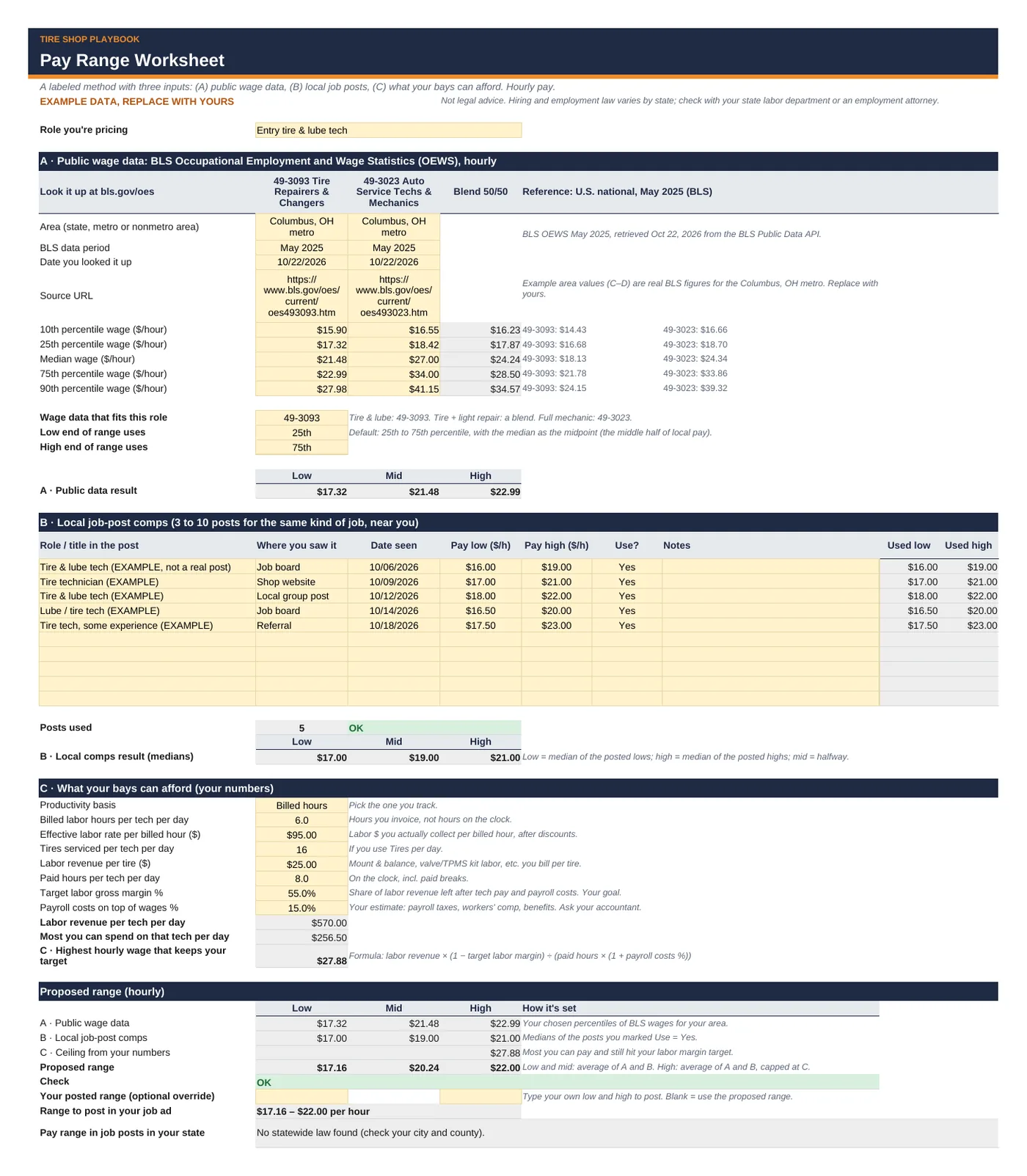
- Price the job with a method you can explain: BLS wage data (May 2025) for tire repairers and auto service techs in your state or metro, plus 3–10 local job posts, plus the most your labor numbers can support. It proposes a low / mid / high range, checks it against your minimum wage, and writes the "range to post" line.
- Compare pay plans fairly: one week of hourly, flat-rate, hybrid and per-tire spiff pay side by side, with minimum-wage top-up and overtime.
- Post in the right places: four job ads (entry tire & lube, experienced tire & light repair, service writer, commercial / truck) and a where-to-post guide with costs and terms checked Oct 2026.
- Screen and interview the same way every time: a phone screen script, an interview question bank by role with what to listen for, and a "questions to avoid" list with legal alternatives.
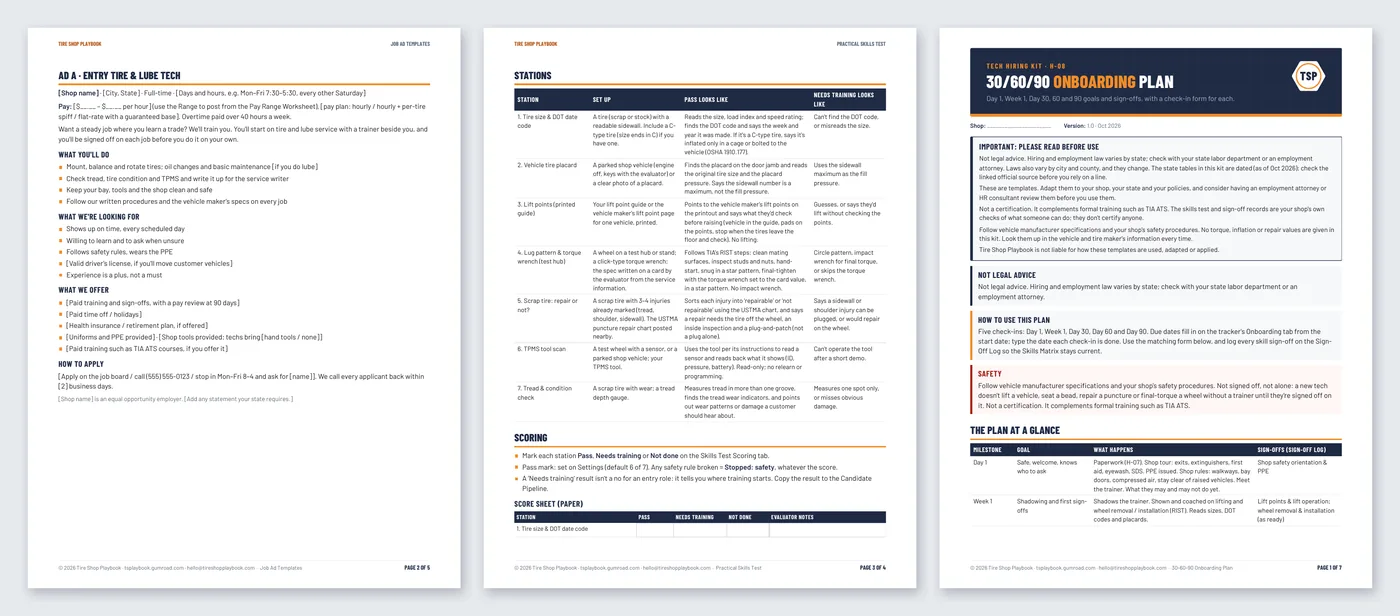
- See it done before you hire: a 7-station practical skills test on shop items (no customer cars, no lifting, no inflating) with safety rules and a scoring rubric.
- Onboard on purpose: a new-hire paperwork checklist with dated state tables, and a 30/60/90 plan with a check-in form for each milestone.
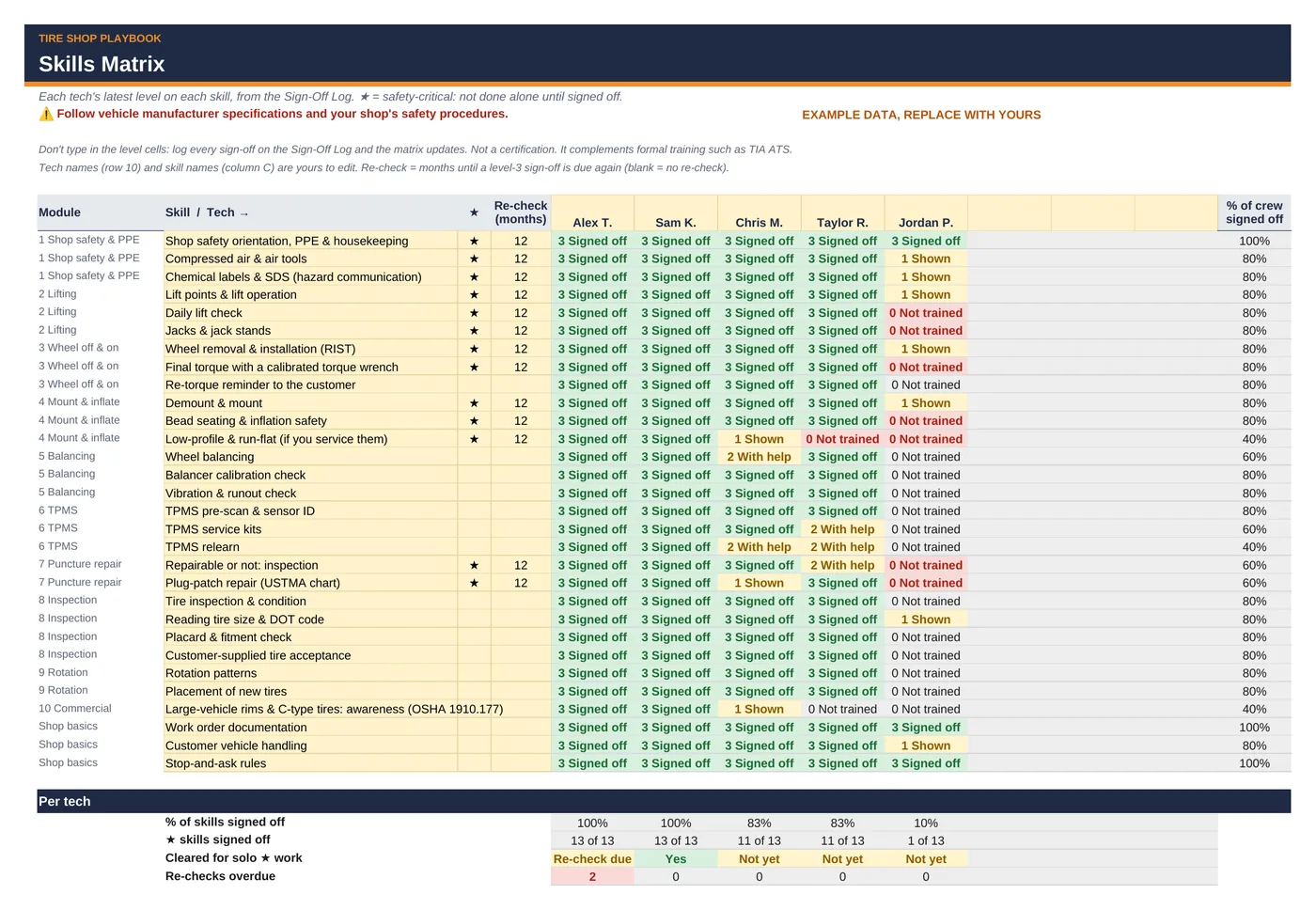
- Know who's cleared: a Skills Matrix and Sign-Off Log with ★ safety-critical skills, % of crew signed off, and re-check dates.
What's included
tech-hiring-training-tracker.xlsxwith 11 tabs:- Start Here: a 15-minute how-to and the important notes
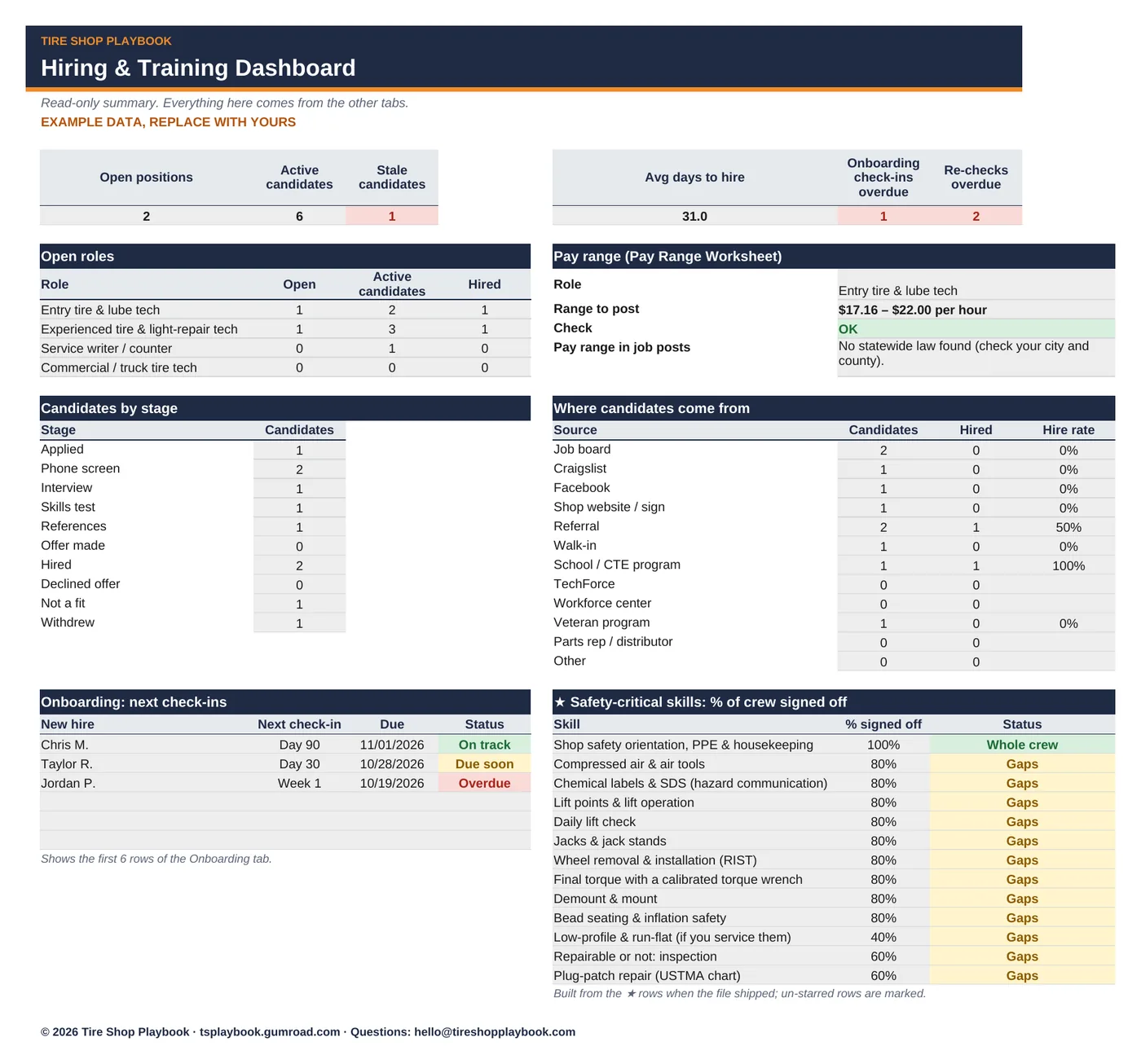
- Dashboard: open roles, candidates by stage, hires by source, days to hire, onboarding check-ins due, ★ skills by % of crew
- Settings: shop info, your state, headcount, minimum wage, roles, milestones, pass marks, skill level words
- Pay Range Worksheet: public wage data, local job-post comps, what your bays can afford, proposed range and pay-plan comparison
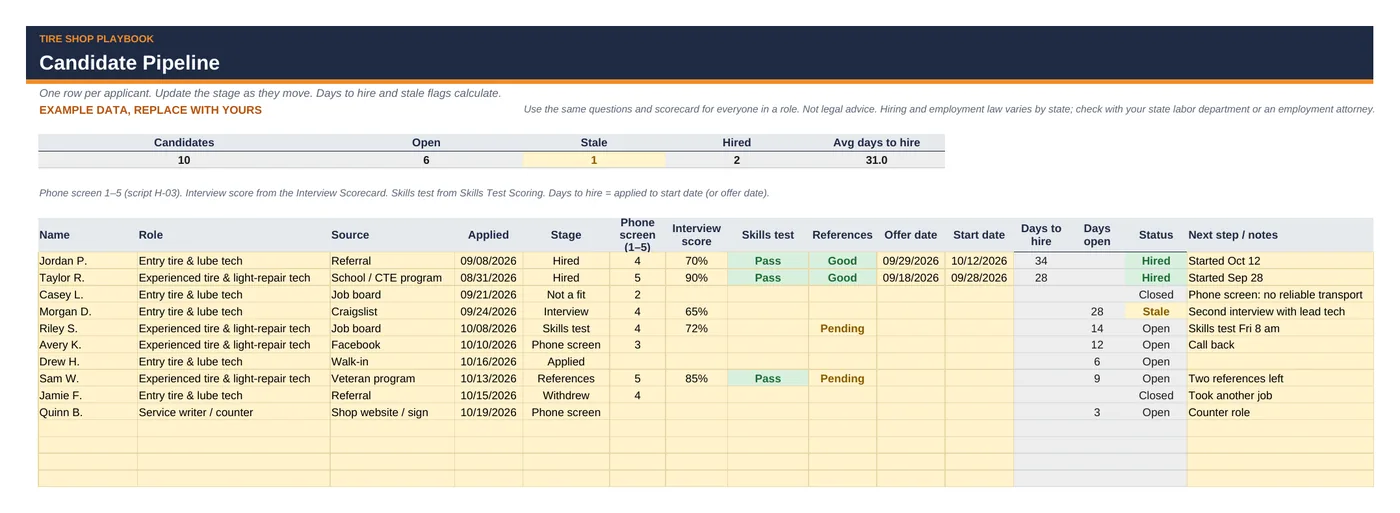
- Candidate Pipeline: up to 60 candidates with source, stage, scores, days to hire and stale flags
- Interview Scorecard: 6 candidates side by side, 5 weighted criteria with anchors
- Skills Test Scoring: 7 stations, Pass / Needs training, safety stop
- Onboarding 30-60-90: 20 new hires with due dates, overdue flags and the Day 90 decision
- Skills Matrix: 30 skills × up to 8 techs, latest level, ★ skills, cleared for solo work
- Sign-Off Log: 300 rows with re-check due dates
- Lists: dated state tables (new-hire reporting deadline and site, labor office, pay range in job posts) with sources
- 8 hiring documents, each as editable Word (.docx) and PDF:
- H-01 Job Ad Templates (4 ads)
- H-02 Where to Post Guide
- H-03 Phone Screen Script
- H-04 Interview Question Bank (with questions to avoid)
- H-05 Practical Skills Test (stations, safety rules, rubric, score sheet)
- H-06 Reference Check & Offer Letter
- H-07 New-Hire Paperwork Checklist (with 51-row state table and pay-transparency table, as of Oct 2026)
- H-08 30/60/90 Onboarding Plan (with 5 check-in forms)
- Includes a step-by-step Quick Start Guide (PDF):
tech-hiring-kit-quick-start-guide.pdf, 7 pages, with annotated screenshots. - Example data so you can see how it works. Replace it with your own.
- Works in Google Sheets and Excel. No macros, no add-ons, no subscription.
Questions
Is this legal advice?
No. Not legal advice. Hiring and employment law varies by state; check with your state labor department or an employment attorney. The state tables are dated (as of Oct 2026) with links to the official sources, and laws change, so check the link before you rely on a line.
Is the skills test or the Skills Matrix a certification?
No. Not a certification. It complements formal training such as TIA ATS. It records your shop's own checks of what someone can do.
Does it include torque, tire pressure or repair limits?
No. Follow vehicle manufacturer specs and your shop's safety procedures. The skills test has the evaluator read specs from the vehicle maker's service information, and puncture repair limits come from the USTMA chart posted in the bay.
Where do the pay numbers come from?
The U.S. Bureau of Labor Statistics (OEWS, May 2025) for SOC 49-3093 Tire Repairers and Changers and 49-3023 Automotive Service Technicians and Mechanics. The example uses real figures for one metro; you type in your own state or metro from bls.gov/oes. The example job posts are labeled examples, not real posts.
Is the training library included?
No. This is the core hiring kit. It doesn't include training modules. The training library comes only in the Tech Hiring & Training Kit ($79), which also includes everything in this kit.
Does it work in Google Sheets and Excel?
Yes. Upload the .xlsx to Google Drive and open it with Google Sheets, or open it in Excel. Formula cells are locked in Excel (no password) and color-coded grey in Sheets, so type only in the yellow cells. The documents open in Word and Google Docs.
Refunds?
All sales are final. If a file doesn't work, email hello@tireshopplaybook.com and we'll make it right.
A look inside
Screenshots with example data. Replace it with your own numbers.