Operations · Google Sheets + Excel
Tire Estimate, Work Order & Invoice Kit
A clean, signed 1-page tire estimate with the out-the-door price, a work order for the bay with torque and re-torque fields, and a 1-page invoice at pickup.
What it does
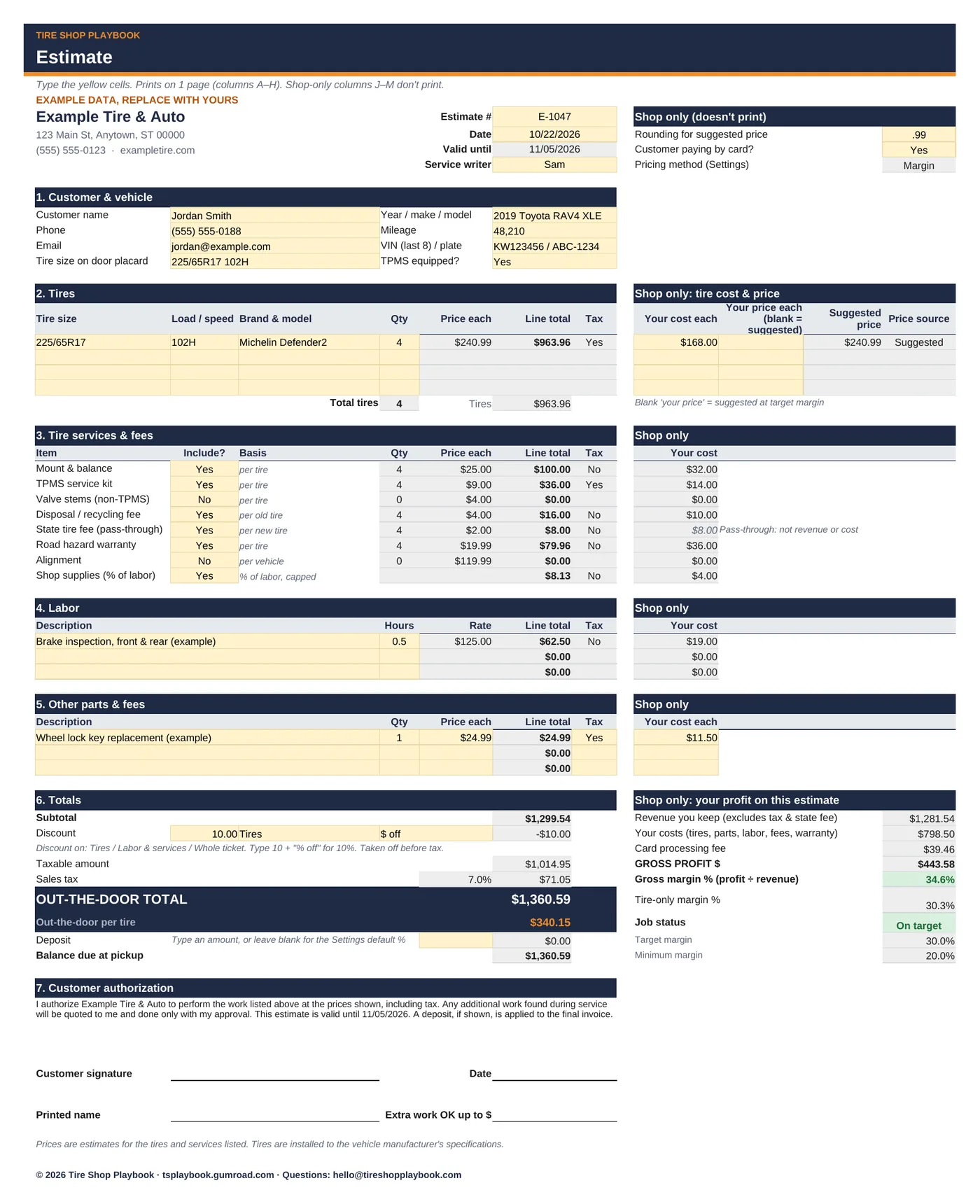
A handwritten estimate or a POS screen the customer can't read loses jobs. So does an estimate where the tax, disposal and TPMS kits only show up at pickup. This kit puts every line on one printable page: tires, services, labor, parts, discount, tax, out-the-door total and the price per tire. Then the customer signs it, the bay gets a work order, and at pickup the same lines print as an invoice with the payment and balance due.
Enter your shop's numbers once (labor rate, mount & balance, TPMS kit, fees, tax and which items are taxable). After that, type the tire cost and pick Yes/No for each service. Suggested tire prices use the same margin and rounding logic as our Tire Pricing & Margin Calculator, or you can type your own price.
It's built for service writers, not spreadsheet experts. Yellow cells are where you type. Grey cells calculate. You don't need to write any formulas.
What it helps you do:
- Hand over a clean estimate: customer and vehicle info, up to 4 tire lines (size, load/speed, brand & model, qty), mount & balance, TPMS service kits or valve stems, disposal, state tire fee, road hazard, alignment, shop supplies, 3 labor lines at your labor rate and 3 parts lines.
- Get the tax right for your state: tires and parts are taxed; set whether labor and fees, the state tire fee and road hazard are taxable.
- Show the number customers ask for: out-the-door total and out-the-door per tire, with deposit and balance due.
- Discount on purpose: $ or % off the tires, labor & services, or the whole ticket, taken off before tax.
- See your profit before you hand it over: shop-only columns (they don't print) show gross profit $, margin % and an On target / Below target / LOW MARGIN status.
- Get it signed: authorization text, signature, date and "extra work OK up to $" lines. Prints on 1 page.
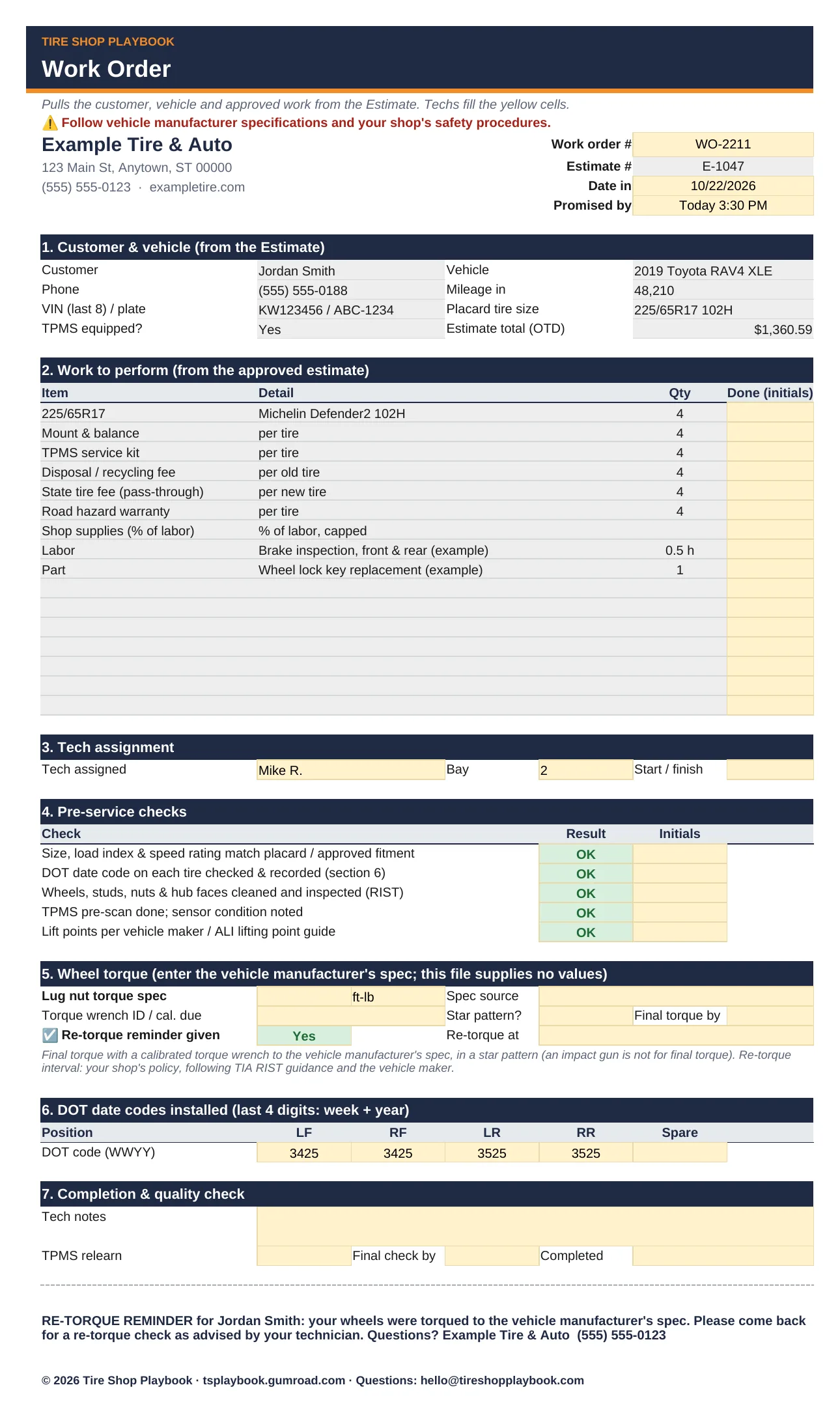
- Send it to the bay: the Work Order pulls the approved lines and adds tech assignment, pre-service checks, a torque spec field (you enter the vehicle maker's value), torque wrench ID, a re-torque reminder check, DOT codes installed and a tear-off re-torque reminder.
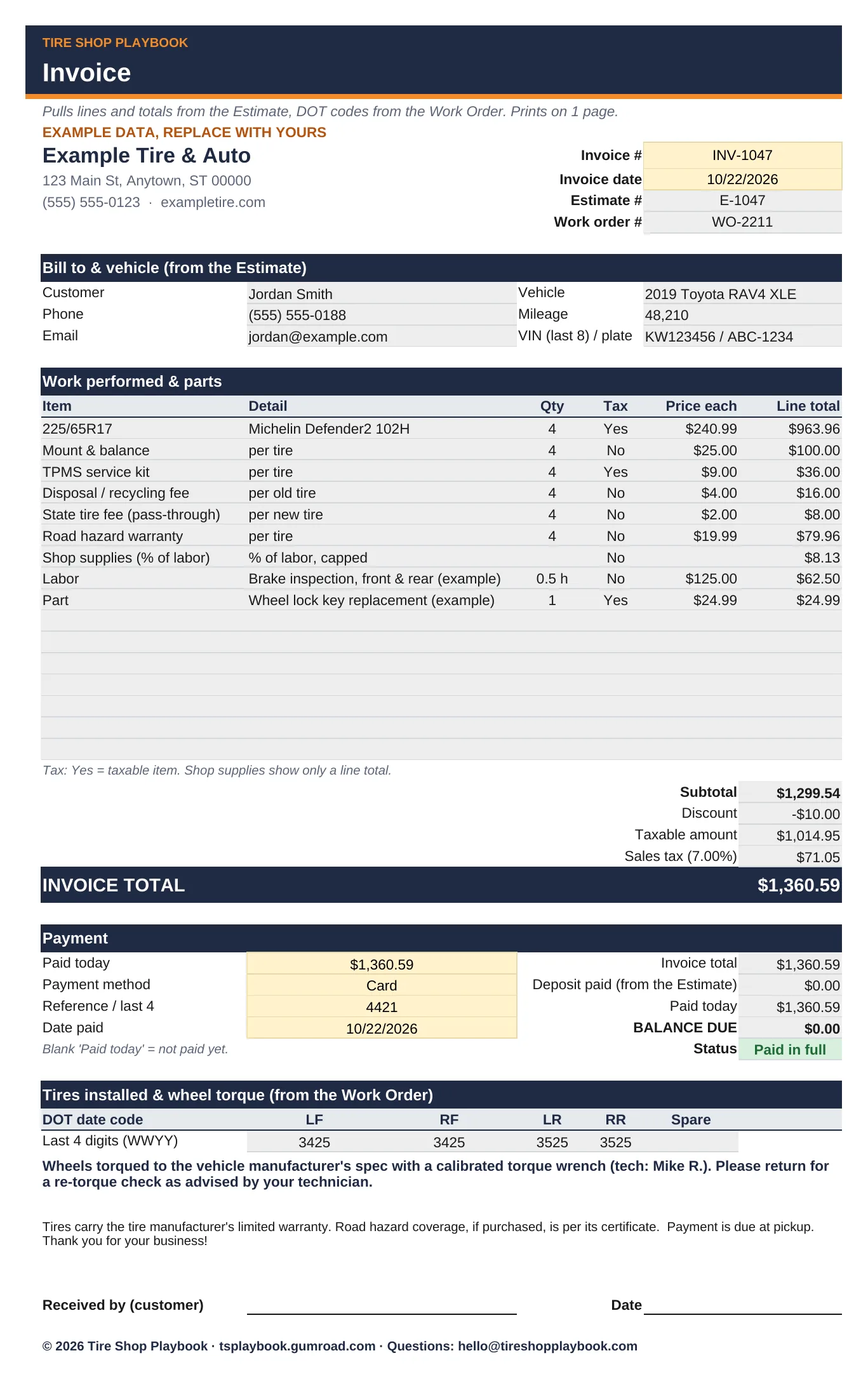
- Bill it at pickup: the Invoice pulls every priced line, the totals and any deposit from the Estimate, plus the DOT codes and the re-torque note from the Work Order. Type the invoice #, payment method and amount paid; it shows the balance due and "Paid in full". Your warranty note and payment terms print at the bottom. 1 page.
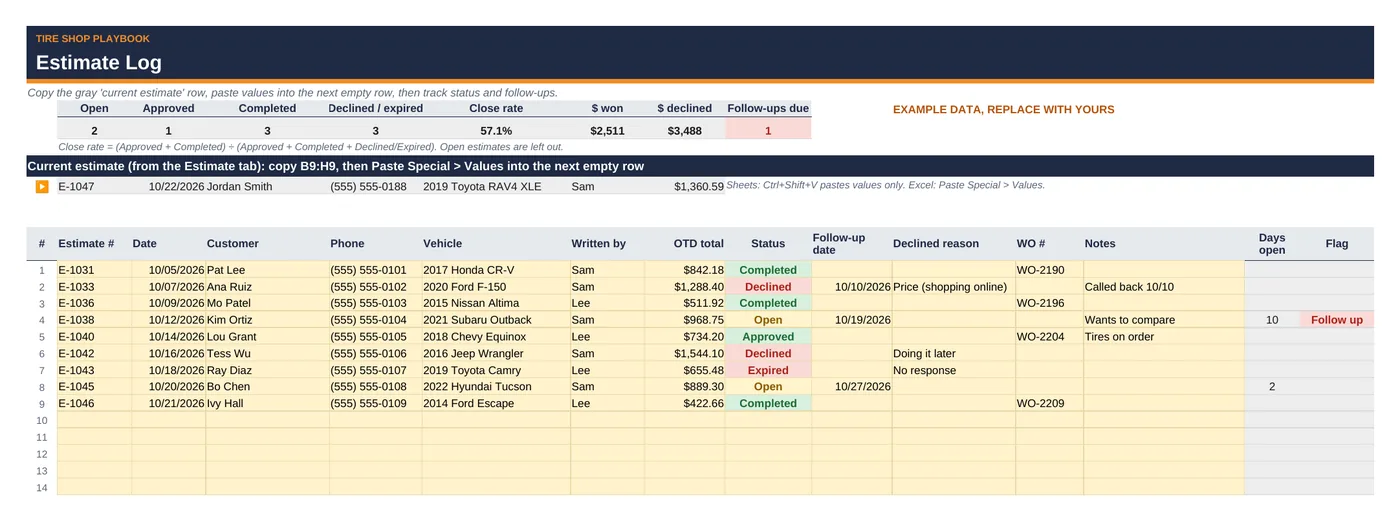
- Follow up on the ones you didn't close: the Estimate Log tracks status, follow-up dates, declined reasons, close rate and dollars won or declined.
What's included
tire-estimate-work-order-invoice-kit.xlsxwith 6 tabs:- Start Here: a 10-minute how-to
- Settings: shop name and address; the calculator's pricing rows (same labels and order, so you can paste them over); labor rate and cost; taxable toggles; default deposit; estimate valid days; up to 6 tech names; invoice and warranty notes
- Estimate: the 1-page customer estimate with shop-only profit columns
- Work Order: bay copy with checks, torque spec field and re-torque reminder
- Invoice: 1-page customer invoice with payment, balance due, DOT codes and re-torque note
- Estimate Log: 100 rows with status colors, follow-up flags and close rate
- Includes a step-by-step Quick Start Guide (PDF):
tire-estimate-work-order-invoice-kit-quick-start-guide.pdf, 6 pages, with a worked example and annotated screenshots. - Example data so you can see how it works. Replace it with your own numbers.
- Works in Google Sheets and Excel. No macros, no add-ons, no subscription.
Questions
Does it work in Google Sheets?
Yes. Upload the .xlsx to Google Drive and open it with Google Sheets (or use File > Import). It uses standard formulas, dropdowns and conditional formatting. There are no macros or add-ons.
Does it work in Excel?
Yes, desktop or web. If Excel shows a "Protected View" bar, click Enable Editing so the formulas calculate.
Does it supply torque specs?
No. The Work Order has a field for the torque spec and its source. Enter the value from the vehicle manufacturer's service information. Follow vehicle manufacturer specifications and your shop's safety procedures.
Does it connect to my POS?
No. It's a standalone spreadsheet for shops without a POS, or as a printable counter estimate and invoice alongside one. It doesn't process payments; it records them.
Is the invoice a legal or tax document?
It's a clear customer receipt built from your Estimate. Some states have rules for what a repair invoice must show (for example, itemized parts and labor, or returning replaced parts). Check your state's rules and adjust the notes on Settings. Keep the warranty note to what you actually offer.
Does it handle my state's taxes and fees?
You set the tax rate, the state tire fee, the disposal fee and which items are taxable. Tax rules differ by state, so check with your accountant. This is a pricing tool, not tax or legal advice. The authorization wording is a plain-English starting point; have your attorney review it for your state.
Do I need the calculator too?
No, it works on its own. If you have the Tire Pricing & Margin Calculator, its Settings rows paste straight in.
Can I change it?
Yes. Formula cells are locked in Excel (no password) and color-coded grey in Google Sheets, so type only in the yellow cells. In Sheets, Ctrl+Z or File > Version history undoes an accidental overwrite.
Refunds?
All sales are final. If a file doesn't work, email hello@tireshopplaybook.com and we'll make it right.
A look inside
Screenshots with example data. Replace it with your own numbers.