Pricing · Google Sheets + Excel
Tire Pricing & Margin Calculator
Quote out-the-door tire prices in seconds and see your real profit before you hand the customer a number.
What it does
If you price tires as "cost plus a few bucks," you might be leaving money on the table, or losing it once TPMS kits, disposal, shop supplies and card fees come out. This spreadsheet does that math for you.
Enter your shop's numbers once (target margin, mount & balance rate, fees, sales tax and card fee). After that, type a tire cost and get a full out-the-door quote with your gross profit in dollars and percent.
It's built for shop owners and service writers, not spreadsheet experts. Yellow cells are where you type. Grey cells calculate. You don't need to write any formulas.
What it helps you do:
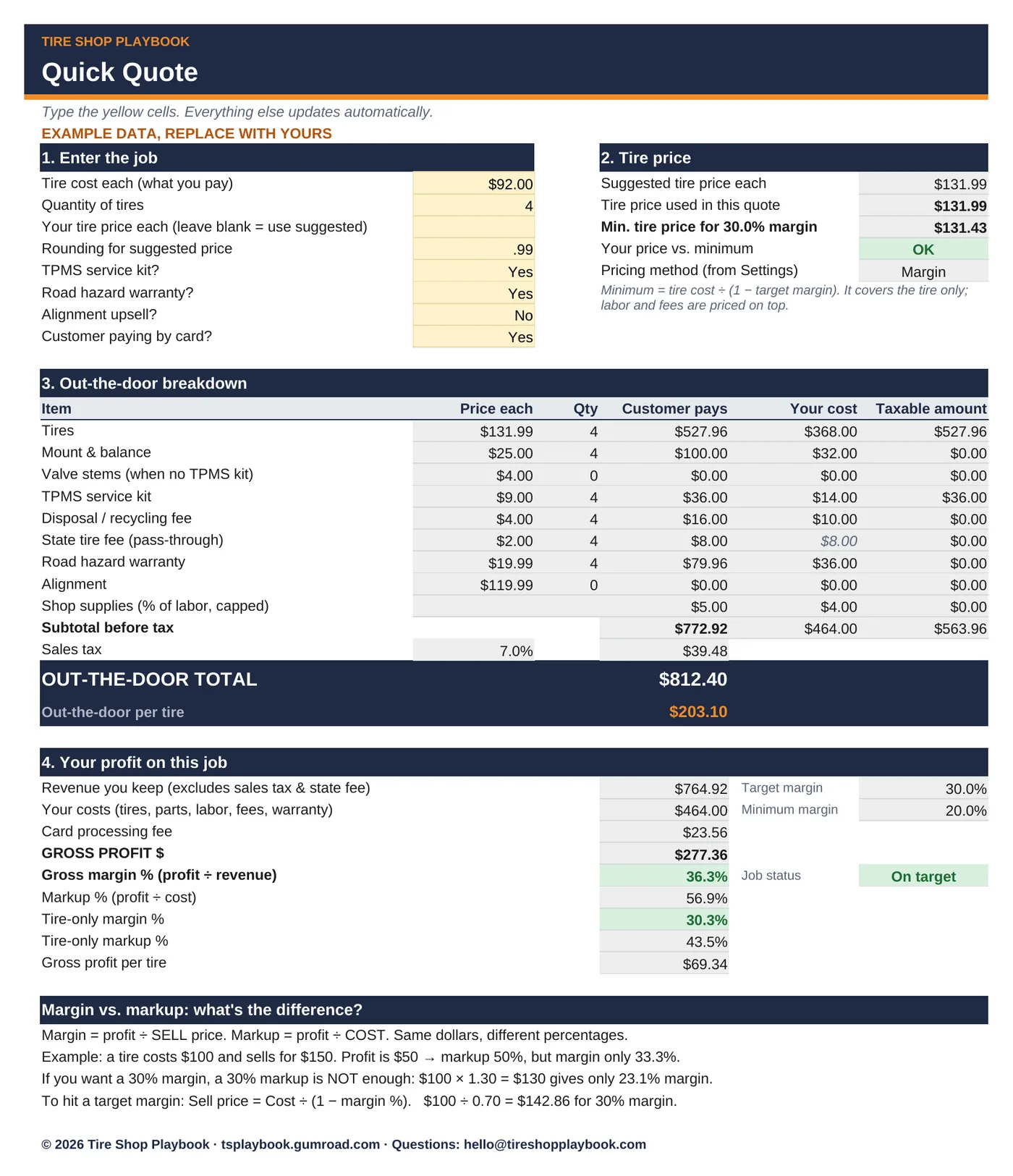
- Quote faster: tire cost + quantity + a few Yes/No choices (TPMS kit, road hazard, alignment, paid by card) gives you the out-the-door total and the price per tire.
- Know your profit on every job: gross profit $, gross margin % and markup %, for the whole ticket and for the tire alone.
- Stop underpricing: see the minimum tire price that still hits your target margin.
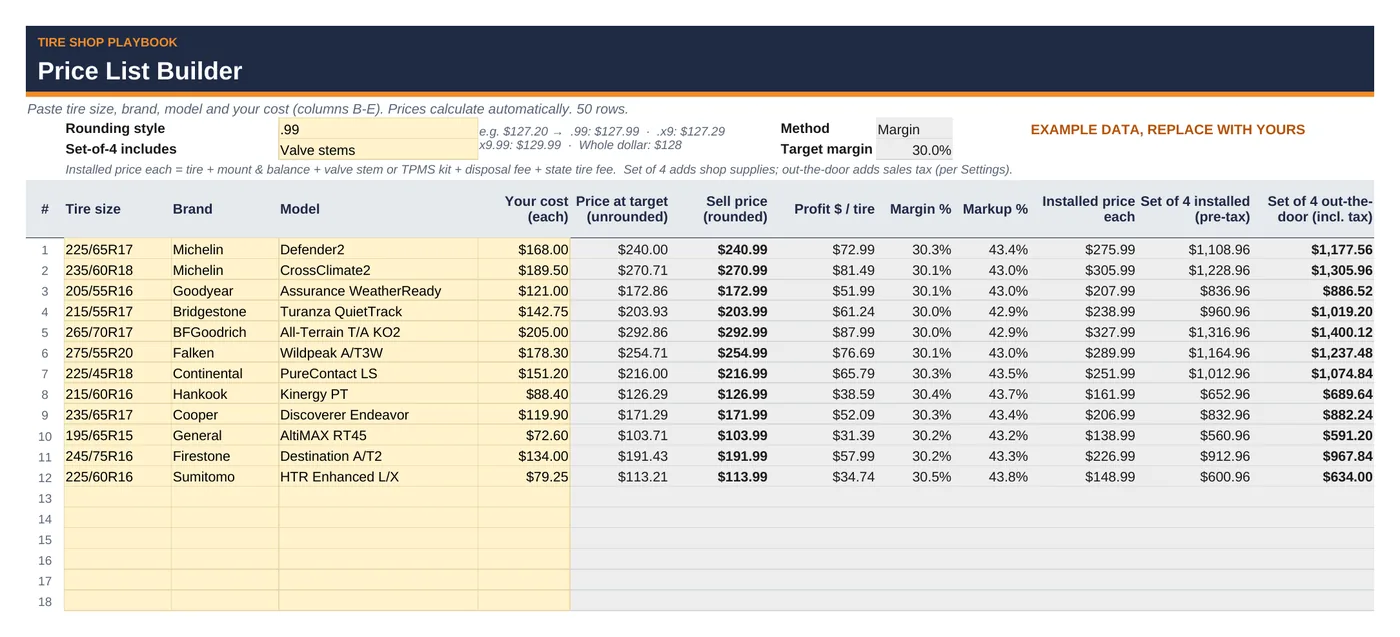
- Build a price list in one paste: drop in up to 50 sizes, brands, models and costs and get sell prices at your target margin, rounded to the ending you pick (.99, .x9, x9.99 or whole dollar), plus the installed price for a set of 4.
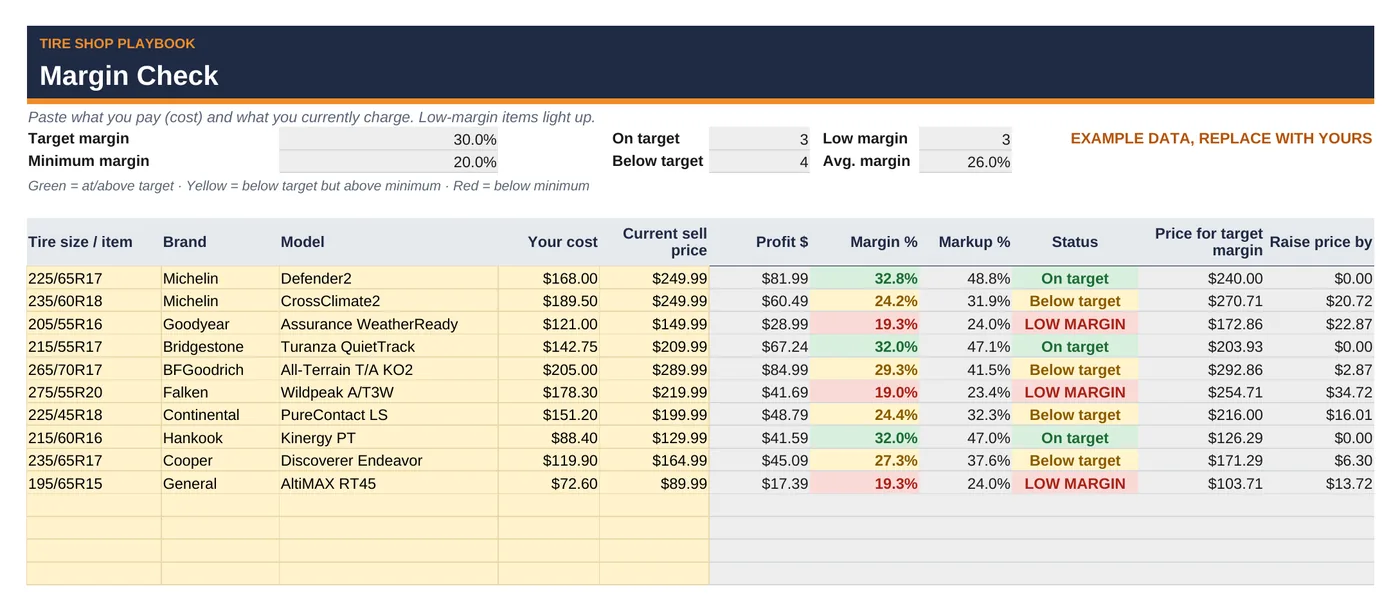
- Find low-margin tires: paste your cost and current sell price. Each item is flagged green (on target), yellow (below target) or red (below your minimum).
- Stop mixing up margin and markup: both are shown side by side, with a plain-English explanation.
What's included
tire-pricing-margin-calculator.xlsxwith 5 tabs:- Start Here: a 5-minute how-to and a margin vs. markup primer
- Settings: your shop defaults: pricing method (margin or markup), target and minimum margin, mount & balance, TPMS kit, valve stems, alignment, disposal fee, state tire fee, shop supplies % and cap, sales tax, labor taxable (Yes/No), card fee, road hazard cost and price
- Quick Quote: a line-by-line out-the-door quote with profit
- Price List Builder: 50-row price list with rounding and set-of-4 installed pricing
- Margin Check: color-coded low-margin finder (40 rows)
- Includes a step-by-step Quick Start Guide (PDF):
tire-pricing-margin-calculator-quick-start-guide.pdf, 6 pages. Get set up in 5 minutes, then walk through each tab with a worked example and annotated screenshots. - Example data so you can see how it works. Replace it with your own numbers.
- Works in Google Sheets and Excel. No macros, no add-ons, no subscription.
Questions
Does it work in Google Sheets?
Yes. Upload the .xlsx to Google Drive and open it with Google Sheets (or use File > Import). It uses standard formulas, dropdowns and conditional formatting. There are no macros or add-ons.
Does it work in Excel?
Yes. It opens in Microsoft Excel (desktop or web). If Excel shows a "Protected View" bar, click Enable Editing so the formulas calculate.
Do I need spreadsheet skills?
No. Type in the yellow cells and pick from the dropdowns. Everything else is calculated for you.
Are the tire prices in the file real?
No. All tire names, costs and fees are example data to show how the sheet works. Use your own distributor costs and shop rates.
Does it handle my state's taxes and fees?
You set your own sales tax rate, state tire fee, disposal fee and whether labor and fees are taxed. Tax rules differ by state, so check with your accountant. This is a pricing tool, not tax or legal advice.
Does it connect to my POS or distributor?
No. It's a standalone spreadsheet. You paste or type costs in.
Can I change the numbers and layout?
Yes. It's your copy. Formula cells are locked in Excel (no password) and color-coded grey in Google Sheets, so type only in the yellow cells. In Sheets, Ctrl+Z or File > Version history undoes an accidental overwrite. Keep a backup before you edit a formula.
Refunds?
All sales are final. If a file doesn't work, email hello@tireshopplaybook.com and we'll make it right.
A look inside
Screenshots with example data. Replace it with your own numbers.